 MERIDIAN
Music books
Write music in a book and play it on any jukebox. Notes, chords, tempo, 22 instruments, loud and soft passages, and several parts playing at once: enough to write a real song.
- 1Get a book and quill
Craft one from a book, an ink sac and a feather. You can also use a signed book.
- 2Write the music
Type notes into the pages, separated by spaces, e.g.
C D E F G1. The rest of this page explains everything you can write. Words that aren't music are skipped, so you can add a title or lyrics between the notes. - 3Punch a jukebox with the book
Hold the book and left-click (punch) a jukebox. The music plays from the jukebox for everyone nearby, and the action bar shows how long the piece is.
- 4Stop it
Sneak and punch the jukebox with a book. Breaking the jukebox stops it too. Punching it again with a book starts that book from the beginning.
Good to know
- VolumeMusic books use Minecraft's Jukebox/Note Blocks volume slider, like music discs.
- WhereAny jukebox you're allowed to use: in the wilderness, and in towns where you can switch things (your own town, or one that trusts you).
- LengthUp to 10 minutes per book. Several jukeboxes can play at once.
- Selling musicSigned books can be copyrighted so nobody else can copy them: see Copyright at the bottom.
Your first song
Copy this into a book and punch a jukebox. It's Twinkle Twinkle Little Star, one note per beat, with each beat lasting 300 milliseconds.
d300
C C G1 G1 A1 A1 G1 -
F F E E D D C -
G1 G1 F F E E D -
G1 G1 F F E E D -
C C G1 G1 A1 A1 G1 -
F F E E D D C -
d300 sets the speed, each letter is a note, G1 and A1 are a G and an A one octave up, and each - is a beat of silence. The rest of this page explains each of those, and more.
Notes
There are seven note letters, A B C D E F G, always written in capitals. Add # for sharp or b for flat: F#, Bb, C#, Ab.
- One after anotherNotes separated by spaces play one after another, one beat each.
C D Eplays C, then D, then E. - At the same time (chords)Notes written together with no space play at the same moment.
CEGis a C major chord,GBDis G major,A1C1E1is A minor an octave up. You can mix single notes and chords freely:C CEG D DF#A. - Sharps and flats
#raises a note by a semitone,b(small b) lowers it.A#andBbare the same note.
Octaves and the note ladder
Minecraft's note blocks cover two octaves, and they start on F#, not on C. So each octave runs from F# up to F. That's the one thing that catches everyone out: inside an octave, G is lower than C.
| Octave | From lowest to highest |
|---|---|
| 0 (the default) | F# · G · G# · A · A# · B · C · C# · D · D# · E · F |
| 1 (add 1 to the note) | F#1 · G1 · G#1 · A1 · A#1 · B1 · C1 · C#1 · D1 · D#1 · E1 · F1 |
| 2 | F#2 only: the very top note |
So to climb a scale from C, go up through octave 0 and step into octave 1 when you pass F:
C D E F G1 A1 B1 C1Writing C D E F G would drop down to the low G at the end.
Changing the default octave
- Per noteAdd the octave number right after the note (and after any # or b):
A1,C#1,Bb1. Notes with no number use the default octave. - For everything after
o1makes octave 1 the default for the notes that follow, untilo0switches back.o1 C D E o0 Cplays C1 D1 E1, then the low C.
Tempo and rests
Every note (or chord) takes one beat, then the next one plays. A beat is 50 milliseconds unless you change it, which is very fast, so almost every song starts by setting the speed.
| You write | What it does | Example |
|---|---|---|
d + milliseconds | Each beat lasts that many milliseconds. Bigger = slower. | d250 = 4 notes a second |
b + beats per minute | Sets the speed in BPM instead, like sheet music. | b120 = 120 BPM (500 ms beats) |
- | A rest: one beat of silence. Every extra dash rests one more beat. | C - - D = C, two silent beats, D |
You can change the speed in the middle of a piece: everything after d150 plays at the new speed.
b100
C E G1 C1 - - G1 E C - - -
d150 C D E F G1 A1 B1 C1
Short notes
Symbols written straight after a note (no space) make the wait after that note shorter, so the next note comes sooner. They're how you write quick runs and uneven rhythms without changing the tempo.
| Symbol | Wait after the note | Example (with d400) |
|---|---|---|
\ | Half a beat. Each extra \ halves it again. | C\ D: D comes 200 ms after C |
* | A third of a beat (for triplets). | C* D* E* F: three quick notes in one beat |
/ | A quarter of a beat. | C/ D/ E/ F/ G1: four very quick notes |
They combine with sharps, octaves and chords: F#1\, CEG*. For a long note, add rests after it instead: C - - - holds for four beats.
d400
C\ C\ G1 G1 A1* A1* A1* G1 -
Instruments
Write i and a number to switch instrument. It stays until you switch again. The default is the piano (i0).
| Code | Instrument | Code | Instrument |
|---|---|---|---|
i0 | Piano (default) | i11 | Cow Bell |
i1 | Bass Drum | i12 | Didgeridoo |
i2 | Snare Drum | i13 | Bit (chiptune) |
i3 | Sticks / hi-hat | i14 | Banjo |
i4 | Bass | i15 | Pling |
i5 | Flute | i16 | Zombie |
i6 | Bell | i17 | Skeleton |
i7 | Guitar | i18 | Creeper fuse |
i8 | Chime | i19 | Ender Dragon growl |
i9 | Xylophone | i20 | Wither Skeleton |
i10 | Iron Xylophone | i21 | Piglin |
Drums (i1, i2, i3) still take a note, which changes how high they sound: i1 C for a deep kick, i2 F#1 for a sharp snare.
Loud and soft
Dynamic markings set how loud the notes after them are. Louder notes also carry further from the jukebox.
| Marking | Name | Loudness |
|---|---|---|
p | piano | Quiet: the default |
mp | mezzo-piano | Moderately quiet |
mf | mezzo-forte | Moderately loud |
f | forte | Loud |
To make a single note stand out without changing the marking, put an accent after it: > plays it one level louder, ^ (marcato) two levels louder.
p A A A B> C^ D D D
mp A A A f B B B
In the first line, A A A and D D D are quiet, B is a step louder and C two steps louder. In the second, A A A is moderately quiet and B B B loud.
Several parts at once: labels
Chords play notes at the same moment, but for a real accompaniment (a bass line under a melody, or drums under a guitar) you need parts that move on their own. That's what labels are for.
How labels work
- Define oneWrite a name followed by a colon, the notes, then a colon followed by the same name:
bass: i4 C - G - :bass. Names can use letters, numbers and underscores. - It plays straight awayThe closing
:bassboth ends the label and starts playing it. Whatever comes after it plays at the same time as the label. - Play it againWrite
:bassagain anywhere later to replay the same part from that point. - Its own settingsInstrument, octave, speed and loudness changes inside a label only affect the label. The main part keeps its own.
- Several at onceClose several labels one after another and they all start together, along with whatever follows them.
Three instruments playing together, starting at the same moment:
d300
guitar: i7 C E G1 E :guitar
bass: i4 C - G - :bass
drums: i1 C i3 C1 i1 C i3 C1 :drums
i0 C1 B1 A1 G1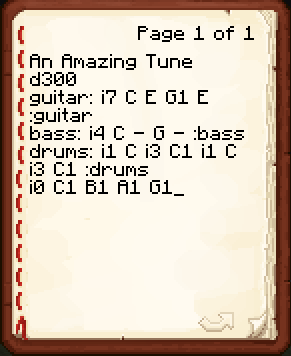
Here the guitar, bass and drums parts all start together with the piano melody on the last line. To repeat the backing for a second line of melody, play the labels again:
:guitar :bass :drums
E1 D1 C1 D1
A full example
The opening of Beethoven's Ode to Joy, with a bass line underneath. Paste it across a couple of pages if it doesn't fit on one; pages simply follow on from each other.
Ode to Joy
d280 mf
bass: i4 C - - - G - - - C - - - G - - - :bass
E E F G1 G1 F E D C C D E E - D D -
:bass
E E F G1 G1 F E D C C D E D - C C -
The title on the first line is ignored because it isn't music. bass starts under the first line of melody, and :bass replays it under the second.
Tips and common mistakes
- My melody jumps downNotes above F need octave 1: G1, A1, B1. Remember the ladder starts on F#, so plain G is the low G.
- It plays all at oncePut spaces between notes.
CDEis one chord;C D Eis three notes. - It's far too fastThe default beat is 50 ms. Start the book with
d250orb120. - Nothing playsNotes must be capital letters, and only the symbols on this page count as music. Check for a missing space or a lowercase note.
- A note is missingAnything above F#2 is out of range and is skipped.
- PagesAll pages are read in order as one long piece, so a phrase can carry on over a page break.
- CommentsAny word that isn't music is ignored. Write the title, a composer credit or lyrics between the notes. Avoid all-capital words like CAGE, which are read as notes.
Copyright: stop others copying your music
Signed books can be copied in a crafting table, so anyone with your book could make their own copies to sell. Copyright stops that. It's the same /mapart command used for map art.
- Sign it firstOnly signed books can be copyrighted. Sign the book and quill (which turns it into a written book) once the music is finished, because signed books can't be edited.
- Lock itHold the signed book and use
/mapart lock(75 gold). From then on only you can copy it, in a crafting table or a crafter. - Copies stay protectedCopies you make for buyers keep the lock, so your customers can play them but can't copy them again.
- Unlock it
/mapart unlock(30 gold), owner only.